
How to Measure SEO ROI: Metrics, Formula and Dashboard
Every business owner paying for SEO eventually asks the same question, usually around month three. “Is this actually working?”
It is a fair question, and most SEO reports answer it badly. They show rankings going up and traffic going up and leave the owner to guess what that means in money. Rankings are not revenue. Traffic is not revenue. If you cannot connect the work to leads or sales, you cannot know whether to keep paying for it.
This guide shows how to make that connection. It gives you the formula, the places the numbers come from, the metrics worth tracking each month, and a simple dashboard that answers the question honestly. It is written for owners and managers, not analysts, and it works whether you sell products online or generate leads for a service.
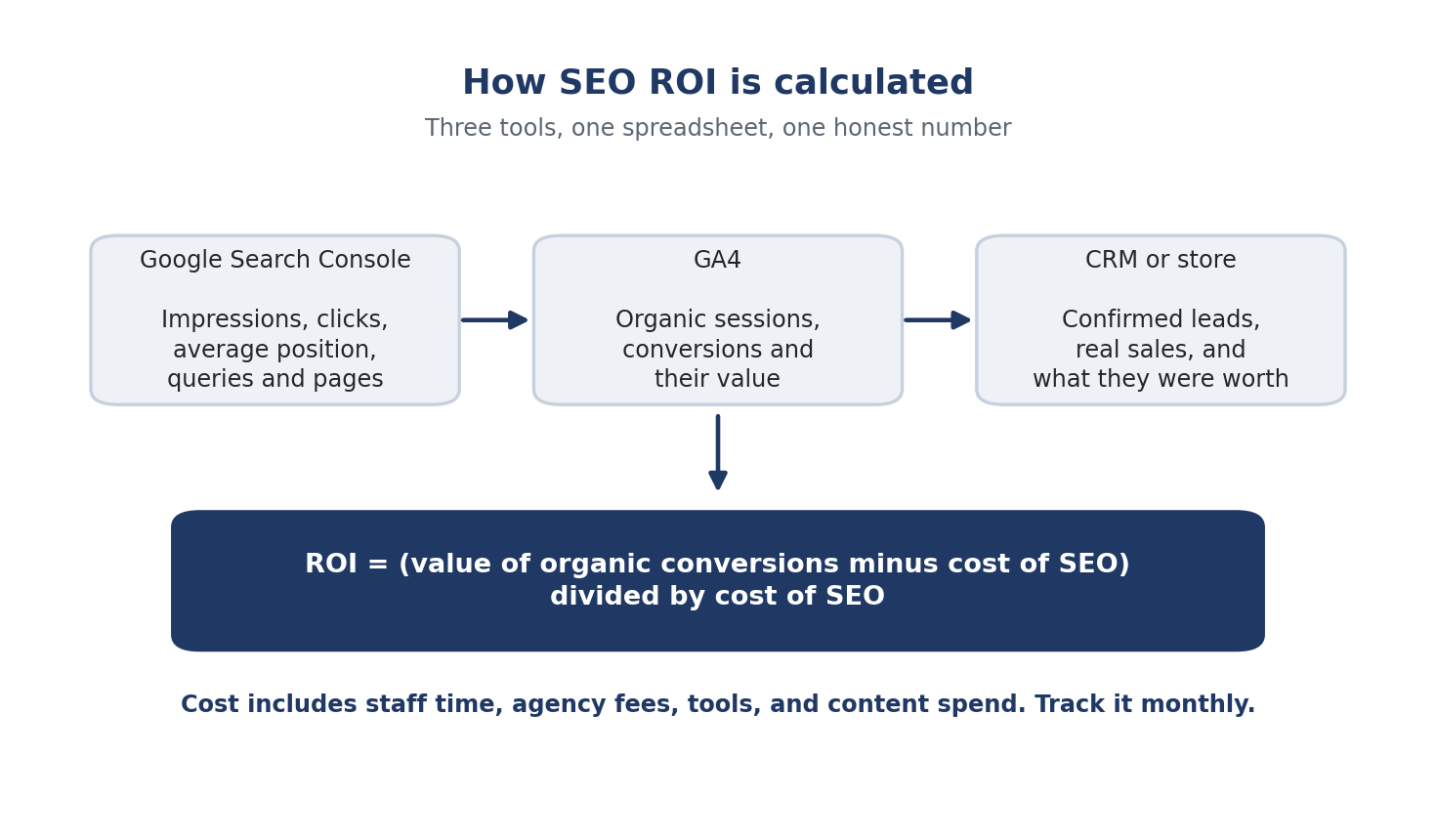
The formula
SEO return on investment is the value SEO produced, minus what it cost, divided by what it cost.
ROI = (value of organic conversions minus cost of SEO) divided by cost of SEO
If organic search produced 30,000 in sales or lead value over a period and SEO cost 10,000 in the same period, the ROI is 200 percent. For every unit spent, two came back on top.
Simple on paper. The work is in the two numbers.
Number one: what SEO actually costs
Add up everything, not just the agency invoice.
In house time. Anyone on your team who writes, edits, builds pages, or fixes technical issues for SEO, including designers and developers, counted at a fair share of their cost.
Agency or freelancer fees.
Tools. Rank tracking, keyword research, analytics add ons, SEO plugins.
Content and promotion spend. Writers, photography, any outreach or PR cost that supports the SEO work.
Pick a period and use it consistently. Monthly is the easiest to start with, and quarterly smooths out the noise once you have a few months of data.
Number two: what organic search is worth
This is where most reports stop short. Here is how to get a real number.
If you sell online
Your store already knows the value of each sale. Connect it to GA4 so purchase values flow into analytics, then filter conversions to the organic search channel. GA4 shows you revenue from organic sessions directly. That is your value number, and it is the cleanest case.
If you generate leads
Leads do not arrive with a price tag, so you assign one. Work out what a lead is worth from your own numbers: if one in five qualified leads becomes a client and the average client is worth 20,000, a qualified lead is worth about 4,000. Give different lead types different values if they convert differently. A quote request is worth more than a newsletter signup.
Set those up as conversion events in GA4 with values attached, filter to organic, and you have a value number. Keep it honest. If the sales team tells you half the leads are junk, lower the value until it reflects reality.
The attribution question
A customer rarely sees your site once and buys. They find you on Google, come back through an ad, return directly, then buy. Which channel gets the credit?
GA4 uses a data driven model by default, which splits credit across the channels that contributed. That means organic’s share of assisted conversions is already in your reports. To look closer, open the conversion paths report under the attribution section, pick the conversion event, and filter to organic. You will see how often search started or supported a sale even when it did not close it.
One caution. That model gets more accurate with more conversions. Below a few hundred a month, treat the split as a rough guide, not a precise one.
Where each number lives
Three tools cover almost everything, and they answer different questions.
Google Search Console tells you how you perform in search itself: impressions, clicks, average position, and which queries and pages are earning them. It is the only place to see the searches you are showing up for but not winning yet, which is where the next growth comes from.
GA4 tells you what organic visitors do once they land: sessions, engagement, conversions, and revenue or lead value. This is where the value number comes from.
Your CRM or store tells you what happened after the conversion: which leads became clients, which sales were real, and what they were worth. This is where you check that the GA4 values match reality.
Pull a few numbers from each into one sheet every month, and you have a dashboard.
The metrics worth tracking each month
Resist the urge to track forty things. Eight numbers tell the story.
Organic sessions, from GA4. Is more traffic arriving from search?
Organic conversions and their value, from GA4. Is that traffic turning into leads or sales?
Qualified leads or confirmed sales from organic, from your CRM or store. Did the value hold up?
Impressions and clicks, from Search Console. Are you being seen more, and clicked more?
Average position on your core terms, from Search Console. Are the terms that matter climbing?
Number of pages earning organic traffic, from GA4 or Search Console. Is the footprint widening?
Share of voice or visibility on your target keyword set, from a rank tracker. Is your overall presence growing against competitors?
SEO cost for the month. The denominator.
From those you calculate ROI, cost per organic lead, and the trend on each. That is a full picture on one screen.
For 2026, add one more line: AI visibility. Note whether your brand appears when you ask ChatGPT, Gemini, or Perplexity the questions your customers ask. It is not yet a number in GA4, but it is becoming a real traffic and trust source, and tracking it monthly keeps you ahead. Our guide to auditing your brand’s visibility in ChatGPT and Gemini explains how to measure it.
Building the dashboard
A spreadsheet is enough, and for most businesses it is better than a complex tool because the owner can actually read it.
One row per month. The eight metrics above as columns, plus three calculated columns: ROI, cost per lead, and month over month change in organic value. Add a simple line chart of organic value against SEO cost. When the value line pulls away from the cost line and stays there, SEO is paying off. If it never does, you have a decision to make, and you will be making it with facts.
Add a second tab for your core keywords with position and visibility by month, and a third for pages, showing which ones earn the most organic value. The page view is the most useful of the three, because it tells you what to do next: more of what works.
Why early months look bad, and what to watch instead
SEO takes time to return. New pages take weeks to index and months to climb. Links and authority build slowly. In the first three to six months, a strict ROI calculation will often be negative, and that is normal, not a failure.
What should move early are the leading indicators. Impressions rising in Search Console. More pages earning traffic. Core terms climbing from page three to page two. Share of voice ticking up. Those come before conversions do, and they tell you the work is landing. Our local SEO playbook and our ecommerce SEO guide both describe what early progress looks like in those specific cases.
If the leading indicators are flat after six months, something is wrong with the strategy. If they are climbing, hold steady. The conversions follow.
A worked example
Here is how the numbers look for a real kind of business: a home renovation company that gets leads through its website and pays an agency for SEO.
Costs. The agency charges 2,000 a month. The owner spends about four hours a month reviewing content and approving pages, worth perhaps 200 of her time. Tools cost 100. Total SEO cost: 2,300 a month.
Lead value. The company closes about one in four qualified quote requests, and an average project is worth 24,000 with a margin of about 6,000. So a qualified quote request is worth roughly 1,500 in margin. The owner sets the quote request conversion in GA4 at 1,500.
Month one. Organic search brings 180 sessions and one quote request. Value 1,500, cost 2,300. ROI is negative 35 percent. The report also shows impressions in Search Console up 60 percent and two new pages earning clicks. Negative return, positive signals.
Month four. Organic brings 620 sessions and four quote requests. Value 6,000, cost 2,300. ROI is 161 percent. The renovation service page has moved from position 14 to position 6 on its main term.
Month eight. Organic brings 1,400 sessions and nine quote requests, and the CRM confirms two of the earlier organic leads became projects. Value 13,500, cost 2,300. ROI is 487 percent, and that is before counting the assisted conversions where search started a journey that closed through another channel.
The owner can now see exactly when SEO crossed into profit, which pages did the work, and what the next 2,300 is likely to return. That is the whole point.
Measuring at the page and keyword level
Whole site ROI is useful, but the sharpest insight comes from going one level down.
Calculate value per page. Which blog posts, service pages, and product pages earn organic conversions? Often a small number of pages produce most of the value. Those deserve updates, internal links, and more content like them.
Calculate value per keyword group. Which topics bring buyers and which bring browsers? A page that ranks well for a high traffic term that never converts is a trophy, not a result.
This is also how you forecast. Look at what similar pages produced, estimate the traffic a new set of keywords could bring, apply your real conversion rate, and you have an expectation. Never a guarantee. SEO does not offer guarantees, and anyone who promises one is selling something else. But an honest expectation, checked against the dashboard each month, is how you run SEO like an investment instead of a hope.
Frequently Asked Questions
What is the formula for SEO ROI? Value of organic conversions minus the cost of SEO, divided by the cost of SEO. If organic search produced 30,000 in sales or lead value and SEO cost 10,000, the ROI is 200 percent. Include all costs: staff time, agency fees, tools, and content spend.
How do I put a value on a lead? Use your own numbers. If one in five qualified leads becomes a client and the average client is worth 20,000, a qualified lead is worth about 4,000. Give different lead types different values, set them as conversion values in GA4, and adjust if sales tells you the leads are weaker than expected.
Which metrics should I track for SEO? Eight cover it: organic sessions, organic conversions and value, confirmed leads or sales from organic, impressions and clicks, average position on core terms, number of pages earning traffic, share of voice, and monthly SEO cost. Add AI visibility as a ninth line for 2026.
How long before SEO shows a positive ROI? Usually three to six months at minimum, often longer for competitive terms. Early months often show negative ROI while leading indicators like impressions, pages earning traffic, and rankings climb. If those indicators are rising, conversions typically follow.
Do I need an expensive tool to measure SEO ROI? No. Google Search Console and GA4 are free, your CRM or store already holds sale values, and a spreadsheet with one row per month is enough for a clear dashboard. A rank tracker helps with share of voice but is optional at the start.