Ecommerce SEO 2026: Rank Product and Category Pages
An online store has a problem a blog never has. A blog might have fifty pages. A store has fifty pages plus eight hundred products, two hundred category combinations, and a filter system that can spin up ten thousand URLs nobody asked for.
That is why ecommerce SEO is its own discipline. The basics still apply, but the volume changes everything. Get the structure right and every new product you add inherits it. Get it wrong and every new product adds to the mess.
This guide is for store owners and the teams who run their sites, especially on platforms like WooCommerce and Shopify where the defaults are decent but far from optimized. It covers the pages that actually earn revenue: product pages and category pages.
Start with how shoppers search
Before touching a page, understand the shape of ecommerce search. People move through three kinds of queries.
Broad category queries like “velvet sofa” or “organic face serum.” These are high volume and competitive. Category pages win them.
Specific product queries like “three seater green velvet sofa under 1000” or “vitamin C serum for dry skin.” These are long tail, lower volume each, and much easier to win. Product pages and well built subcategory pages win them.
Comparison and research queries like “velvet vs linen sofa” or “is retinol better than vitamin C.” These are informational. Blog content and buying guides win them, then hand the shopper to a product.
Most stores obsess over the first type and ignore the second, which is backwards. The long tail is where a smaller store beats a giant, because the giant’s pages are generic and yours can be exact.
Product pages: the anatomy of one that ranks
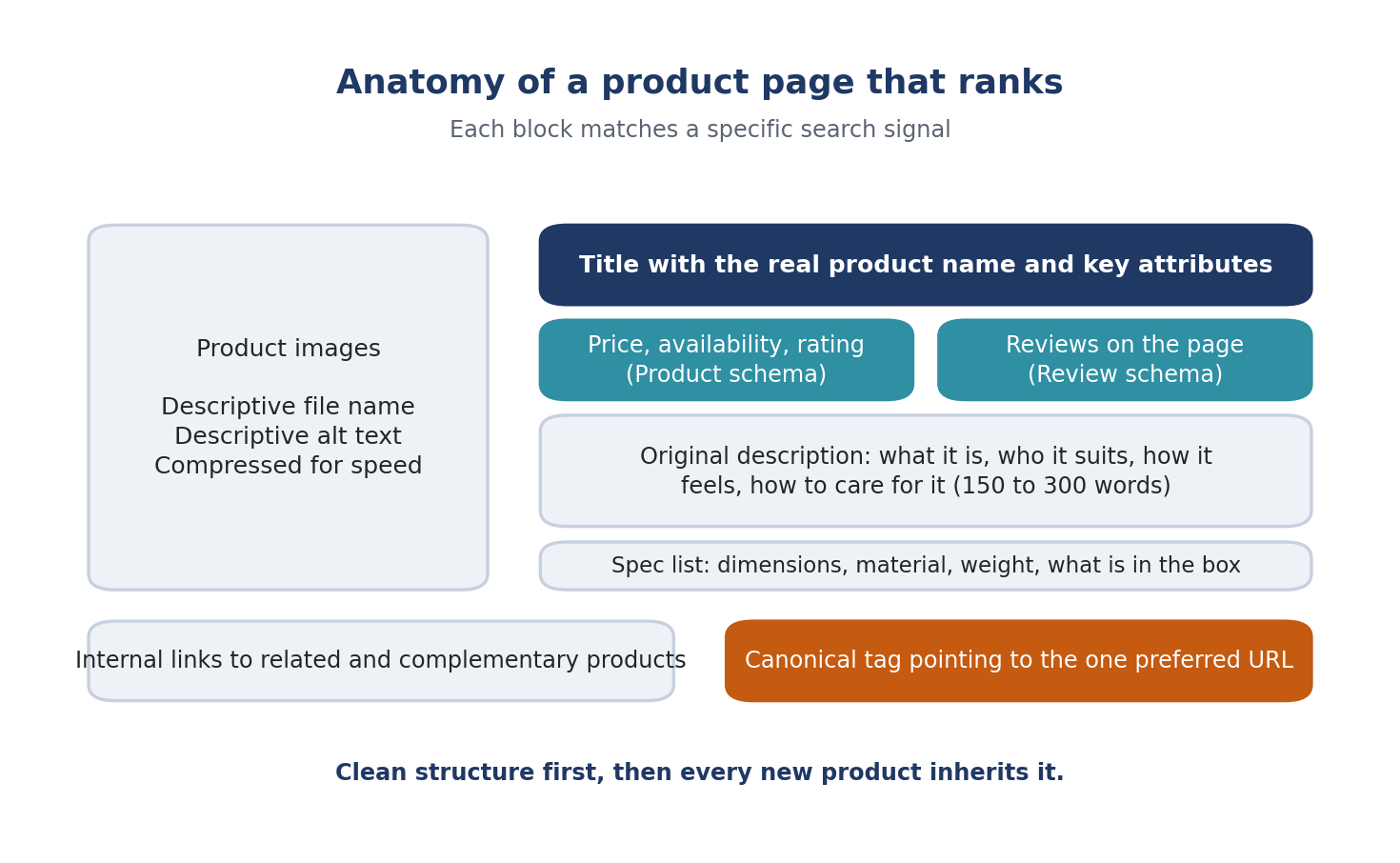
A product page has one job in search: match a specific query so precisely that nothing else is a better answer. Here is each piece.
The title
Put the real product name and its key attributes in the title, in the order a shopper would say them. “Men’s blue cotton shirt, slim fit” beats “Shirt, SKU 4471.” Include the material, color, size or type, and the use when it matters. Keep it readable, not stuffed.
The description
Write your own. Manufacturer copy is pasted across hundreds of stores, and Google treats identical text as duplicate content with little reason to rank yours over anyone else’s. An original description of 150 to 300 words that explains what the product is, who it suits, how it feels, and how to use or care for it will outrank a pasted spec sheet almost every time.
Break the hard facts into a short list: dimensions, material, weight, care, what is in the box. Shoppers scan these, and so do AI shopping assistants when they summarize a product.
Product schema
This is the structured data that tells search engines the price, availability, rating, brand, and identifiers of the product. It is what powers the star ratings and price in search results, and it is how AI assistants read your catalog without guessing. Most platforms add basic product schema automatically, but it is often incomplete. Check that price, availability, review rating, and review count are all present and correct. Our Technical GEO Playbook covers how search engines and AI systems read this kind of structured data.
Images
Every product image needs a descriptive file name and alt text. A file named green_velvet_three_seater_sofa_side.jpg with alt text “Green velvet three seater sofa, side view” tells Google what the image is. A file named IMG_2291.jpg with no alt text tells it nothing. Google Images is a real traffic source for products, and roughly a fifth of all searches happen there.
Compress images before upload. Big product photos are the number one reason store pages load slowly, and slow pages lose both rankings and sales.
Reviews on the page
Reviews are fresh, keyword rich text that you did not have to write. They also feed the rating that appears in search. Ask for them after delivery, show them on the product page, and mark them up with review schema so the stars show in results.
Internal links
Link each product to related and complementary products. Sofa to matching armchair, serum to the cleanser that pairs with it. This helps shoppers go deeper and helps Google understand which products belong together. It also tends to lift order values.
Category pages: your most underused asset
Category pages are the pages most likely to rank for the broad terms with real volume, and most stores treat them as nothing but a grid of thumbnails.
Give each category page a proper title and heading with the category keyword. Write 150 to 400 words of real content at the top or bottom: what the category covers, how to choose, what to look for. Not a keyword paragraph, an actual helpful introduction a shopper would read.
Build subcategories for the long tail. “Sofas” is competitive. “Sleeper sofas,” “small sofas for apartments,” and “leather sofas” are easier, and each one matches a specific intent. A good subcategory structure is how a mid sized store wins hundreds of mid volume terms at once.
Keep category URLs short and readable. A path like /sofas/leather/ beats /collection?cat=47&sub=12. Clean URLs are easier to link, easier to share, and clearer to search engines.
Add internal links between related categories and from your blog content back to the categories it supports.
The duplicate content trap, and how to escape it
Ecommerce sites generate duplicate pages by design. The same shirt appears under “Men,” “New arrivals,” and “Sale.” A color filter creates a new URL for every shade. Sort options create more. Without control, Google sees dozens of near identical pages and splits your ranking strength across all of them.
Three fixes handle most of it.
Use canonical tags. On every product that appears under multiple paths, set the canonical to the one preferred URL. Google then consolidates signals to that version.
Control filters and sorting. Decide which filter combinations are worth indexing as their own pages, which is usually only the ones with real search demand like “leather sofas” or “waterproof mascara,” and keep the rest out of the index. Most platforms and SEO plugins let you set this.
Keep checkout, cart, account, and login pages out of the index entirely. They waste crawl attention and never belong in search.
Check your sitemap, too. It should list product and category pages you want ranked, be updated automatically as products come and go, and be submitted in Search Console. Products that sell out and vanish should redirect to the closest category, not return an error.
Speed is a ranking factor and a sales factor
Google’s mobile first indexing means the phone version of your store is the version that counts. More than half of ecommerce visits are on mobile, and shoppers abandon slow pages fast.
The usual culprits are easy to name: uncompressed images, too many apps and scripts, no caching, no content delivery network. Fix images first, since they are the biggest win. Then audit the apps and remove anything you do not actually use. Then turn on caching and a CDN. A store that loads in under three seconds on a phone has a real edge over most competitors, because most competitors do not.
Content that feeds the catalog
A store with only product and category pages competes on a narrow front. Buying guides, comparisons, and how to content open a second front and send shoppers into the catalog.
“How to choose a mattress for back pain.” “Linen vs cotton bedding.” “What is the difference between retinol and retinal.” Each of these ranks for research queries, builds trust, and links to the products that answer the question. For stores that produce a lot of this, the hybrid content workflow we covered keeps quality high while scaling output.
The same content also shapes how AI assistants describe your products. When an assistant answers “which serum is best for dry skin,” it draws on clear, well structured product and guide pages. The stores that explain their products well get cited. The ones with a photo and a price get skipped. Our AEO checklist covers the formatting that gets content pulled into those answers.
Platform notes: WooCommerce and Shopify
The principles are the same on every platform, but the switches are in different places.
On WooCommerce, almost everything runs through an SEO plugin. Set product and category pages to be indexed, and set tag archives, filter pages, and the shop pagination beyond page one to stay out of the index unless a specific one has real demand. Make sure the plugin is adding product schema, then check a live product in Google’s rich results test to confirm price, availability, and rating are present. Turn on image compression at upload, because WooCommerce stores full size images by default and the media library grows fast. For variants, keep one product page with the variations selectable on it, rather than a separate indexable page per color. And when a product is discontinued, redirect it to the closest category instead of letting it return a not found error, since those old URLs often still carry links and rankings.
On Shopify, collection pages are your category pages, and they already support the written introduction described above through the collection description field. Use it. Shopify automatically creates a canonical for products that appear under multiple collections, which handles most duplicate content, but it still generates URLs for sorted and filtered views that are best left unindexed. Alt text is set per image in the product editor, so build it into the listing process rather than fixing it later. Apps are the main speed problem on Shopify stores: every one adds scripts, so audit them twice a year and delete what you do not use.
On both platforms, the biggest single mistake is leaving the default product title and description from the supplier feed untouched. The platform will not fix that for you.
A realistic timeline
Ecommerce SEO is not instant. Most stores see noticeable movement within three to six months of fixing structure and content, with the long tail product and subcategory terms moving first and the broad category terms following as authority builds. Rankings compound: every product added to a clean structure inherits its strength, which is why the setup work pays for years.
The order that works: fix duplicate content and speed first, because they hold everything else back. Then rebuild category pages. Then work through product pages, starting with the best sellers and the highest margin items. Then add guide content. Then keep going, because a store is never finished.
Frequently Asked Questions
What is the most important part of ecommerce SEO? Structure. Clean category and subcategory pages, canonical tags that stop duplicate content, and a sitemap that reflects the live catalog. Once the structure is right, every product page you optimize and every new product you add builds on it. Without it, individual page work leaks away.
Should I write unique descriptions for every product? Yes, starting with your best sellers and highest margin items. Manufacturer descriptions are duplicated across many stores and give Google no reason to rank yours. An original 150 to 300 word description that explains the product, who it suits, and how to use it outranks pasted copy and reads better to AI shopping assistants.
Do category pages need written content? Yes. A short, genuinely useful introduction of 150 to 400 words with the category keyword in the heading helps the page rank for broad terms. Category pages are usually the best pages on a store for high volume searches, and a bare product grid gives Google almost nothing to work with.
How do I handle filters creating thousands of URLs? Decide which filter combinations have real search demand and let only those be indexed as proper pages. Keep the rest out of the index with canonical tags or noindex settings. Checkout, cart, and account pages should never be indexed at all.
How long does ecommerce SEO take to work? Most stores see noticeable results within three to six months. Long tail product and subcategory terms usually move first, and broad category terms follow as the site builds authority. Fixing duplicate content and page speed early speeds everything else up.