Answer Engine Optimization Website Structure: H1s and FAQs
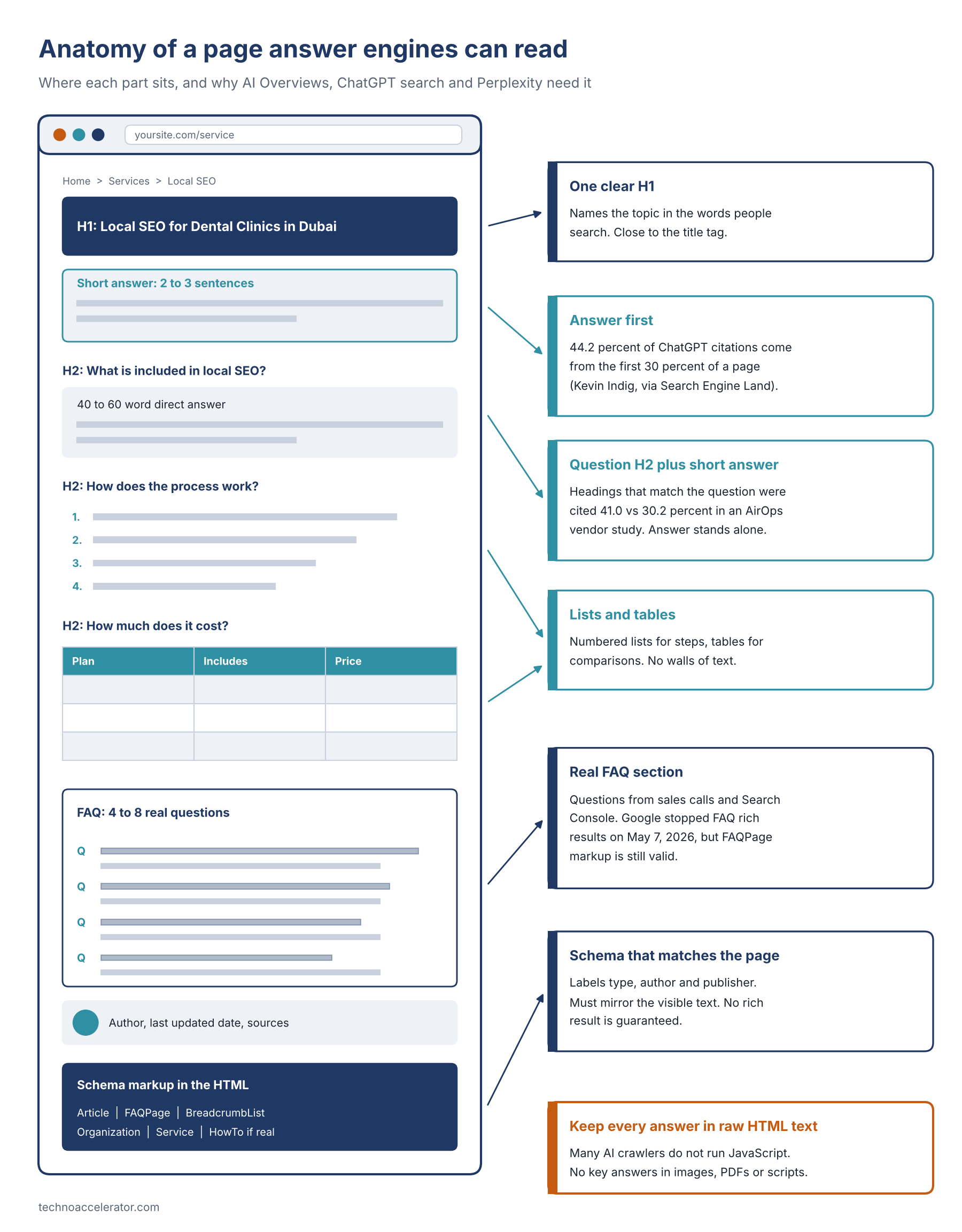
A good answer engine optimization website structure is pretty plain once you see it. One H1 that names the topic. A two or three sentence answer right under it. Question-style H2s, each opened by a direct 40 to 60 word reply. Lists and tables where the content really is a list or a table. A short FAQ built from questions people actually ask. All of it in plain HTML text, with schema that matches what's on screen. That's a layout Google AI Overviews, ChatGPT search, Perplexity and voice assistants can read, lift and credit.
Our AI answer box checklist covers tactics, and the pillar on AEO vs traditional SEO covers strategy. This post is the skeleton underneath: where each part sits, why, and three templates you can copy.
What is website structure for AEO, in plain words?
Website structure for AEO is the order and markup of a page's parts, so a machine can tell what the page is about, find the exact passage that answers a question, and see who stands behind it. It covers headings, where answers sit, lists, tables, FAQs, the raw HTML, schema and internal links.
Answer engines don't read the way people do. Microsoft's Bing team said it plainly in its guide to content for AI search answers: "AI assistants don't read a page top to bottom like a person would." They split pages into pieces and pick the piece that fits.
Position matters too. Kevin Indig's analysis of ChatGPT citations, reported by Search Engine Land, found 44.2 percent of citations came from the first 30 percent of a page, and cited passages were nearly twice as likely to contain a clear definition.
Google, to be fair, says there's "no requirement to break your content into tiny pieces" in its guide to generative AI features in Search. True, but Google isn't the only engine reading your site. The stakes are real, too: in a Pew Research Center study, people clicked a regular result on 8 percent of visits when an AI summary appeared, against 15 percent without one. Fewer clicks make being the quoted source worth more.
What does an answer engine optimization website structure look like, from H1 to FAQ?
Top to bottom: one H1, a short direct answer or definition, a few question-style H2 sections that each open with a 40 to 60 word answer, lists and tables for steps and comparisons, a real FAQ, a visible author and date, and schema that mirrors the visible page. Everything sits in the HTML as text.
Two details matter more than they look. H3s handle narrower follow-ups inside a section, so never jump from H2 to H4. And the schema has to describe the page a reader sees: Google's page on AI features and your website asks you to keep important content in text and make structured data match the visible text.
How should you write the H1 for answer engines?
Use one H1 per page. Make it a plain description of the topic, close to your title tag, in the words your reader would type or say. Skip slogans, brand-only headings and logo images marked up as H1. If the H1 wouldn't tell a stranger what the page answers, rewrite it.
Microsoft's guidance asks for titles and H1s that closely reflect each other, in natural language. So "Welcome to Bright Smile" becomes "Teeth Whitening in Dubai: Prices and Options." And "The Future Is Here" becomes "How to Add FAQ Schema to WordPress."
Why do question-style H2s with short answers work?
People ask answer engines questions, and engines tend to favor a heading that matches the question with a passage under it that answers it on its own. A question H2 followed by a 40 to 60 word answer gives the engine a clean, quotable unit. It gives skimmers the same thing.
The best data here is a vendor study, so weigh it accordingly. AirOps, with Kevin Indig, ran 16,851 queries through ChatGPT for its Fan-Out Effect report (April 2026). Pages whose headings closely matched the query were cited 41.0 percent of the time, against 30.2 percent for weak matches. Ranking still mattered most: Search Engine Land's summary notes top-ranked pages were cited 58.4 percent of the time, versus 14.2 percent at position 10.
Follow-up questions matter too. Ahrefs found only 37.9 percent of URLs cited in AI Overviews also ranked in the top 10 for the original query (March 2026), and points to query fan-out: Google splits one question into sub-questions and pulls sources from those results. H2s that answer the sub-questions get more chances.
Two rules for the answer block. Restate the subject in the first sentence ("FAQPage schema is..." not "It is..."), so it makes sense out of context. And never write "as mentioned above," because the engine may only see this one passage.
When should you use lists and tables instead of paragraphs?
Use a numbered list when order matters, a bulleted list for options or criteria, and a table when you're comparing two or more things across the same attributes. Keep explanation, opinion and context in paragraphs. If you'd build it in a spreadsheet, it probably belongs in a table.
Microsoft is blunt: "Avoid long walls of text." The AirOps numbers are modest: 33.9 percent cited with both lists and tables against 31.0 percent with neither, with a big gap on product pages and almost none on articles. Use tables where content is genuinely tabular, like this one:
Page element | Why answer engines need it | Common mistake |
|---|---|---|
One H1 | States the main topic in one line | Two H1s, or the logo as H1 |
Short answer under the H1 | A quotable summary where citations cluster | Backstory first |
Question-style H2s | Match how people phrase questions and sub-questions | Vague labels like "Overview" |
40 to 60 word answers | Self-contained passages engines can lift whole | Leaning on earlier sections |
Lists and tables | Clean structure for steps and comparisons | Comparisons buried in a paragraph |
Real FAQ section | Catches follow-up questions in natural wording | Invented questions nobody asks |
Plain HTML text | Many AI crawlers skip JavaScript | Key text in images, PDFs or scripts |
Schema markup | Labels page type, author and FAQs for machines | Markup that doesn't match the page |
Author, date and sources | Shows who stands behind the answer | No byline, date or evidence |
Internal links | Show how pages relate | "Click here" anchors, orphan pages |
Do FAQ sections still matter now that Google dropped FAQ rich results?
Yes, for readers and for AI extraction, but not for rich results. Google stopped showing FAQ rich results for every site on May 7, 2026. The FAQPage markup itself isn't deprecated, so keep real FAQ sections and accurate markup, and don't promise anyone expandable FAQ snippets in Google.
The timeline, quickly. In August 2023 Google limited FAQ rich results to well-known government and health sites, and said unused structured data "does not cause problems for Search." HowTo rich results went that September. Google's Search Central changelog then logged the May 2026 removal for everyone, and the feature's documentation came down in June.
So why keep the FAQ? Because questions are how people talk to answer engines. In Indig's ChatGPT data, 78.4 percent of citations tied to questions came from headings, and a good FAQ is a stack of exactly those.
The markup still has a job. FAQPage is a valid schema.org type, and Google says it uses the structured data it finds to understand a page. One honest caveat: Joost de Valk looked for primary evidence that ChatGPT, Claude or Perplexity prefer FAQPage JSON-LD over visible text and found none. The visible FAQ does the heavy lifting.
To build a real one, pull questions from sales calls, support emails and Search Console, in the customer's words. Lead each answer with a yes, a no or a number, and keep answers in the HTML. Microsoft warns that "AI systems may not render hidden content," so don't load answers by script when someone taps a toggle.
Why does clean HTML text matter more than clever design?
Many AI crawlers read the raw HTML your server sends and never run JavaScript. If a key answer only appears after a script runs, or lives inside an image, a PDF or a closed tab, some answer engines won't see it at all. Google copes with JavaScript better, but it's not the only reader.
Vercel's AI crawler study (December 2024) found "none of the major AI crawlers currently render JavaScript," including GPTBot, ClaudeBot and PerplexityBot. Google's AI guide says Google can process JavaScript content as long as it isn't blocked.
It helps to know who's knocking:
Google: AI Overviews run on Googlebot. Google-Extended covers Gemini training and grounding, and Google says it doesn't affect inclusion in Google Search, so blocking it won't remove you from AI Overviews.
OpenAI: OAI-SearchBot (ChatGPT search), GPTBot (training) and ChatGPT-User (user requests), per OpenAI's crawler docs.
Anthropic: ClaudeBot (training), Claude-SearchBot (search) and Claude-User (user requests), per Anthropic's crawler page.
Perplexity: PerplexityBot (search index) and Perplexity-User (user requests).
Quick test: view the page source and search for your first answer paragraph. If it isn't there, many crawlers won't find it either. Our technical GEO implementation playbook covers rendering and robots.txt in depth.
Which schema types belong on which pages?
Article or BlogPosting on posts, FAQPage only where a visible FAQ exists, HowTo only for genuine step-by-step instructions, BreadcrumbList on almost every page, and Organization on your home or about page. Whatever you add must describe what a visitor can actually see, and none of it guarantees a rich result.
Google's AI guide says structured data "isn't required for generative AI search," while still calling it "a good idea" for SEO. AirOps saw pages with JSON-LD cited 38.5 percent of the time versus 32.0 percent without. That's vendor correlation, not proof, but it fits the basics:
Service pages: Organization or LocalBusiness, Service, BreadcrumbList, FAQPage if visible.
Blog posts: Article with a named author, BreadcrumbList, FAQPage if visible, HowTo only for a real procedure.
Home and about pages: Organization with your logo, URL and social profiles.
Which page templates can you copy?
Three cover most sites: a service page that sells one service, a how-to post that walks through one task, and a comparison page that helps someone choose. Each follows the same spine (H1, short answer, question H2s, a table or list, FAQ, schema) with different sections in the middle.
What should a service page look like?
A service page should tell a buyer what you do, who it's for, how pricing works and how to start, in that order. Answer engines get asked "who offers this near me" and "how much does it cost," so those facts belong in text near the top, not in a brochure PDF.
H1: [Service] for [audience or place], such as "Local SEO for Dental Clinics in Dubai"
Short answer: what it is, who it's for, and how pricing works
H2s: What's included? Who is it for? How does the process work? How much does it cost?
A pricing table or a list of what sets the price
FAQ from real sales calls, then a call to action
Schema: Organization or LocalBusiness, Service, BreadcrumbList, FAQPage
What should a how-to blog post look like?
A how-to post should name the task in the H1, say what the reader ends up with and how long it takes, then give numbered steps. Put tools and prerequisites before the steps and troubleshooting after them, so each part can be lifted and quoted on its own.
H1: How to [do the task], with a qualifier if useful ("in WordPress")
Short answer: the steps in two sentences, plus time and difficulty
H2: What do you need before you start?
H2: How do you [do the task], step by step? (numbered list)
H2s: How do you check it worked? What are the common mistakes?
FAQ, author box, "last updated" date, and schema: Article, BreadcrumbList, FAQPage, HowTo only if the steps are the whole page
What should a comparison page look like?
A comparison page should give the verdict up front, show the differences in one table, then explain who each option suits. People ask answer engines "X or Y" and "which is better for Z," and engines need a clear, sourced statement near the top that they can quote.
H1: [Option A] vs [Option B]: Which Is Better for [Use Case]?
Short answer: the verdict, plus the condition that would flip it
Comparison table: price, setup time, best for, limits (sourced facts only)
H2s: When should you choose A? When should you choose B? How did we compare them?
FAQ, then schema: Article, BreadcrumbList, FAQPage
How should internal links support this structure?
Internal links show engines which page is the main authority on a topic and which pages go deeper. Link each cluster post up to its pillar and the pillar back down, use anchor text that describes the destination, and add breadcrumbs so the hierarchy shows in the HTML and in BreadcrumbList schema.
This post sits under our AEO vs traditional SEO pillar and links sideways to the answer box checklist. Keep links as normal HTML links, not script-driven buttons.
On an existing site, start with the ten pages that already rank or bring in leads, and fix the words before the markup. Ranking still matters most, so this sits on top of solid SEO rather than replacing it. Want a second pair of eyes? See our services or book a call.
Frequently asked questions
How many H1 tags should a page have for AEO?
One. A single H1 that names the topic keeps the subject clear for readers, screen readers and answer engines. Many website builders turn the page title into the H1 automatically, so check the rendered HTML for a second H1 hiding in the body or the logo.
Should every page have an FAQ section?
No. Add one where people have real follow-up questions, which covers most service pages, how-to posts and comparison pages. Skip it on contact and legal pages, and never pad an FAQ with questions nobody asks just so the page has one.
Is FAQ schema still worth adding after Google ended FAQ rich results?
Yes, if the page shows a real FAQ. Google stopped showing FAQ rich results on May 7, 2026, so don't expect expandable snippets. FAQPage markup is still valid, still labels questions and answers for machines, and Google has said unused structured data causes no problems. Keep it matched to the visible text.
How long should the answer under each heading be?
Aim for 40 to 60 words for the first answer under each question heading. That's long enough to be complete and short enough to be quoted whole. Put detail, examples and caveats in the paragraphs after it for readers who want more.
Do I need llms.txt or a special AI version of my pages?
Not for Google. Its generative AI guide says you don't need new machine-readable files, AI text files or Markdown versions to appear in Search, and that an llms.txt file won't help or hurt you there. Spend that time on clear HTML pages, which every answer engine can read.